About Me & This Case Study
Hi, I'm Inara. Here's a quick overview of my journey:
3+ years of experience in project management at Envision, a digital design agency.
Managed the project delivery of digital walls, digital fixtures, and the content and CMS systems that support them.
Enjoy working with cross-functional teams to bring ideas from concept to launch.
Active member of the Project Management Institute (PMI), earning both CAPM and PMP certifications.
Passionate about digital product management and building products that solve real user problems.
Why This Case Study?
This case study is a personal project created to strengthen and demonstrate my product management skills. The app concept is based on a real problem I experienced and I've been curious about solving for years. Rather than simply presenting an idea, I wanted to work through the product development process from user research and problem validation to feature prioritization and prototyping, to showcase how I approach building digital products.
1. The Problem
Background
While studying at York University, I began working in real estate on the side with family and friends as clients. Although it wasn't my primary career, it exposed me to an unexpected problem: scheduling showings was incredibly time-consuming.
The Challenge
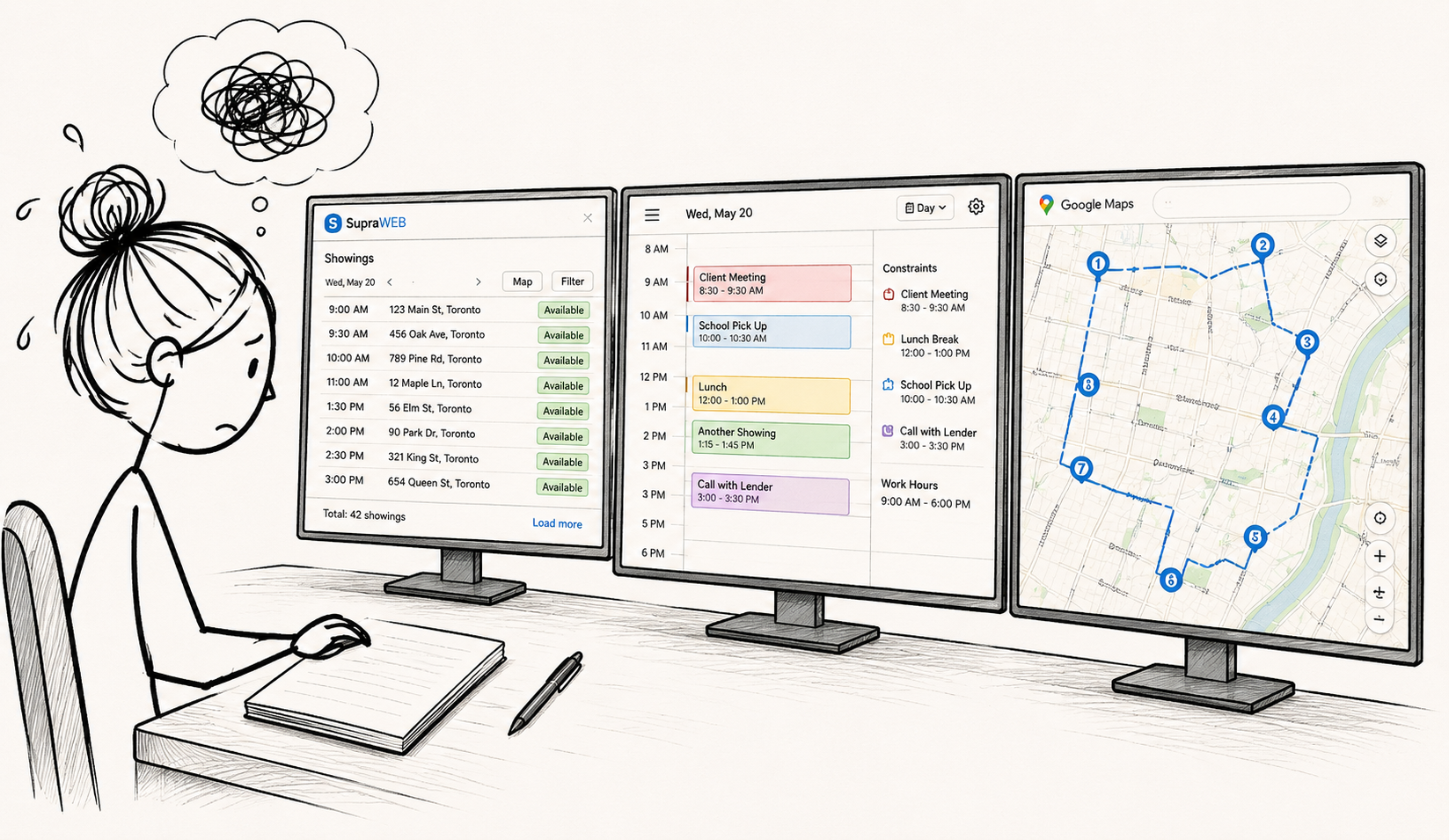
Planning a single day of showings meant constantly switching between multiple tools:
Supra One — Find and book available showing times
Google Maps — Optimize the travel route
Google Calendar — Manage my existing schedule
Client Constraints — Work around everyone's availability
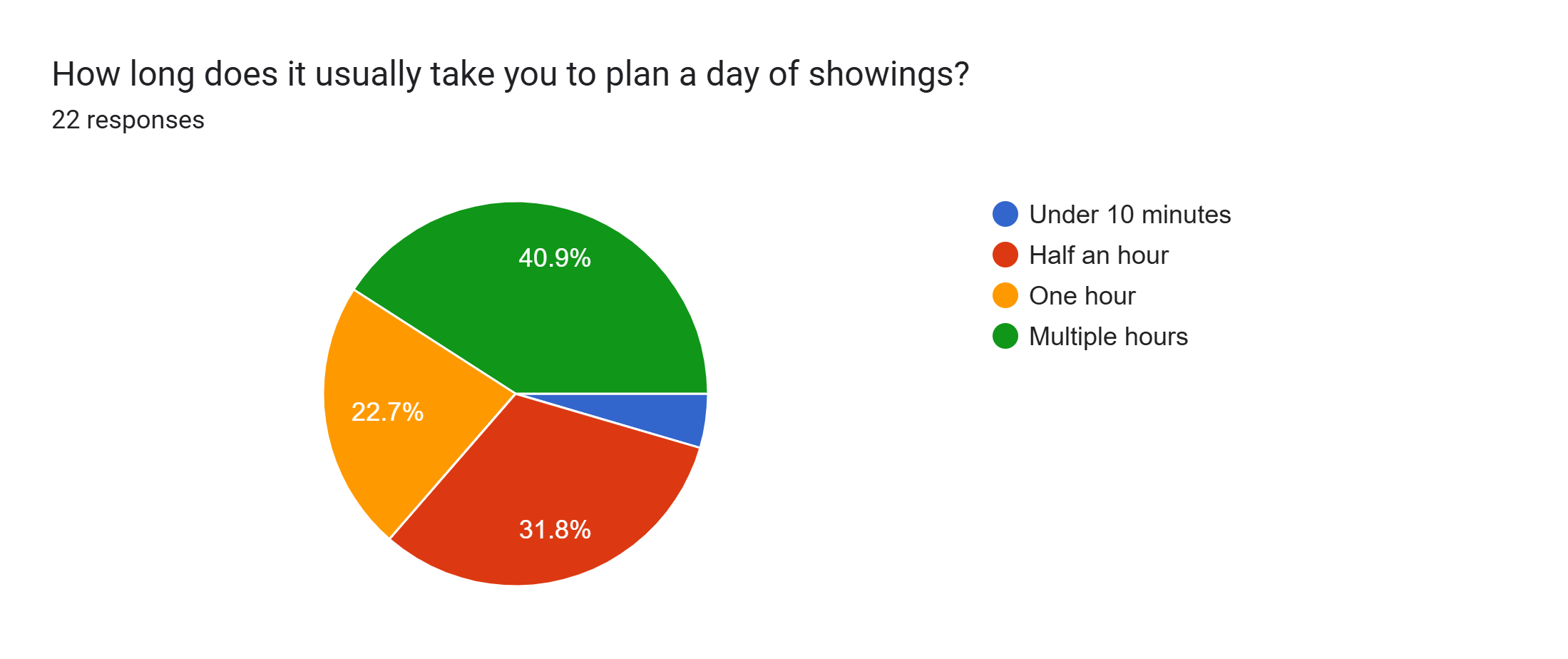
Every appointment affected the next one. Finding the most efficient schedule required manually balancing availability, travel time, and calendar conflicts—often taking hours.
This experience led me to ask a simple question:
What if AI could automatically organize an optimized showing schedule based on listing availability, travel time, and everyone's schedule constraints?
That question became the foundation for this product case study.
Problem Statement
Realtors spend a significant amount of time scheduling appointments and optimizing their daily routes, reducing the amount of time available for client relationships and revenue-generating activities.
Initial Hypothesis
If AI can automate appointment planning, optimize driving / public transportation routes, and intelligently recommend scheduling decisions, realtors can save significant time each week.
The following charts summarize the key insights that shaped the product direction.
. 2. User Research
Objective
Before designing a solution, I wanted to validate whether the scheduling challenges I experienced were shared by other real estate professionals.
My research focused on three questions:
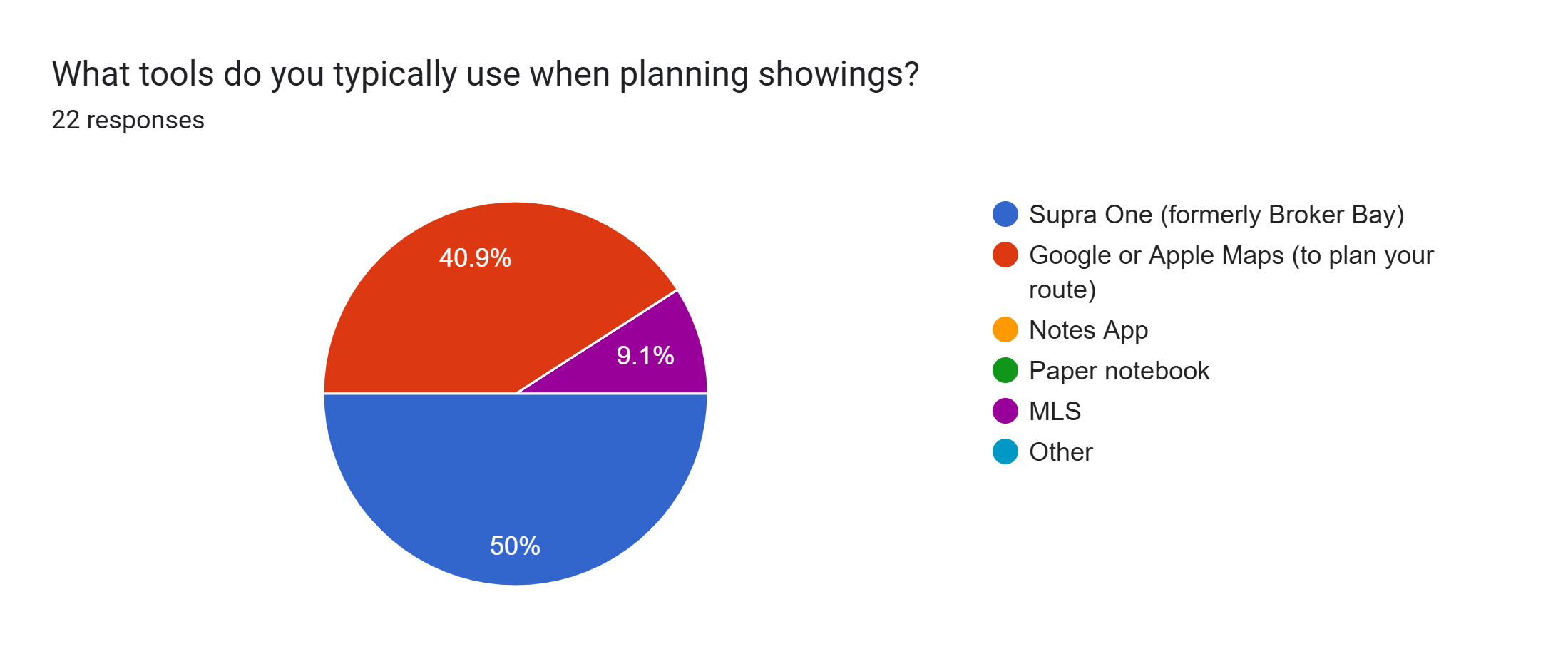
What tools do realtors use to schedule showings?
What are the biggest pain points in the process?
Which features would provide the most value in a scheduling solution?
Research Method
To test my hypothesis, I conducted a survey using my network of Ontario real estate professionals.
Participants 22 Licensed Realtors
Method Anonymous Google Forms survey
Distribution Ontario real estate networking WhatsApp groups
Why an Anonymous Survey?
I intentionally made the survey anonymous to reduce participation barriers and encourage honest feedback. Because the survey was shared within professional group chats, I wanted respondents to feel comfortable sharing frustrations with their current workflows without concern that their responses could be attributed to them.
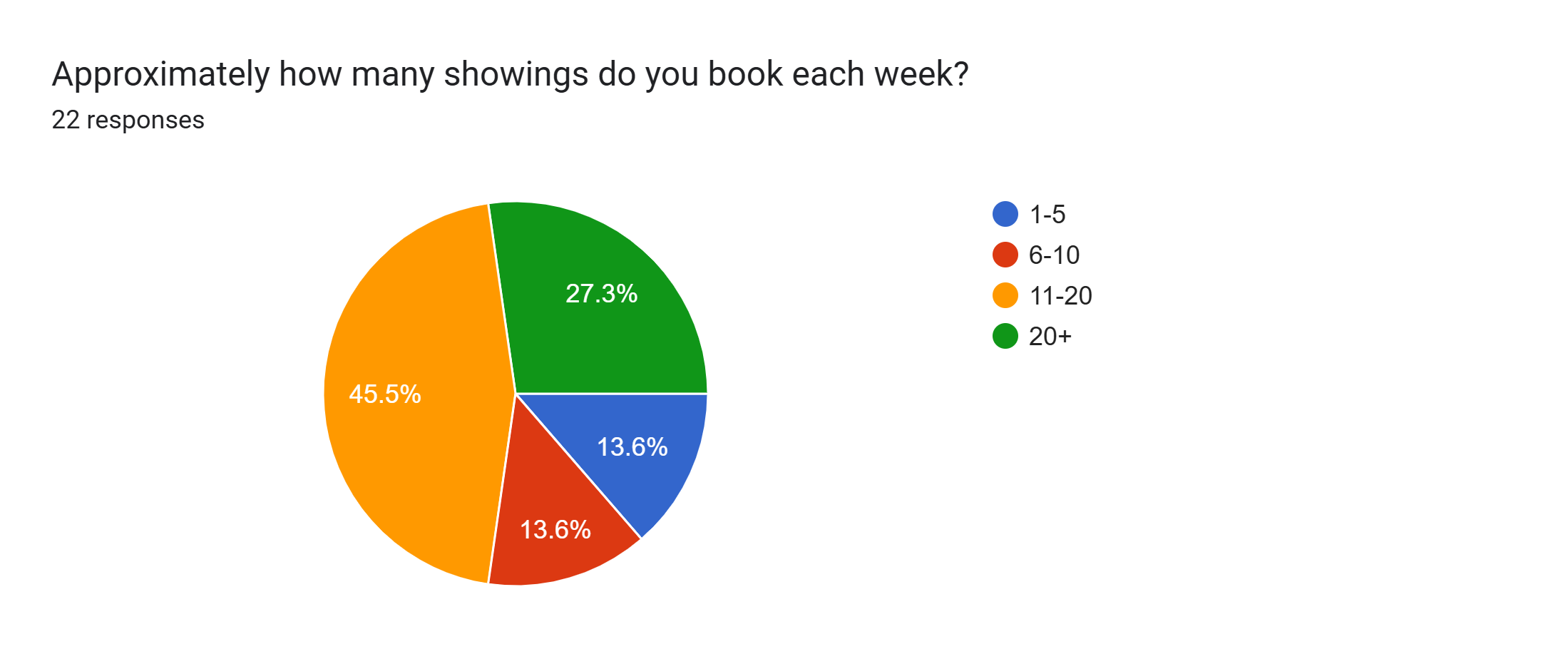
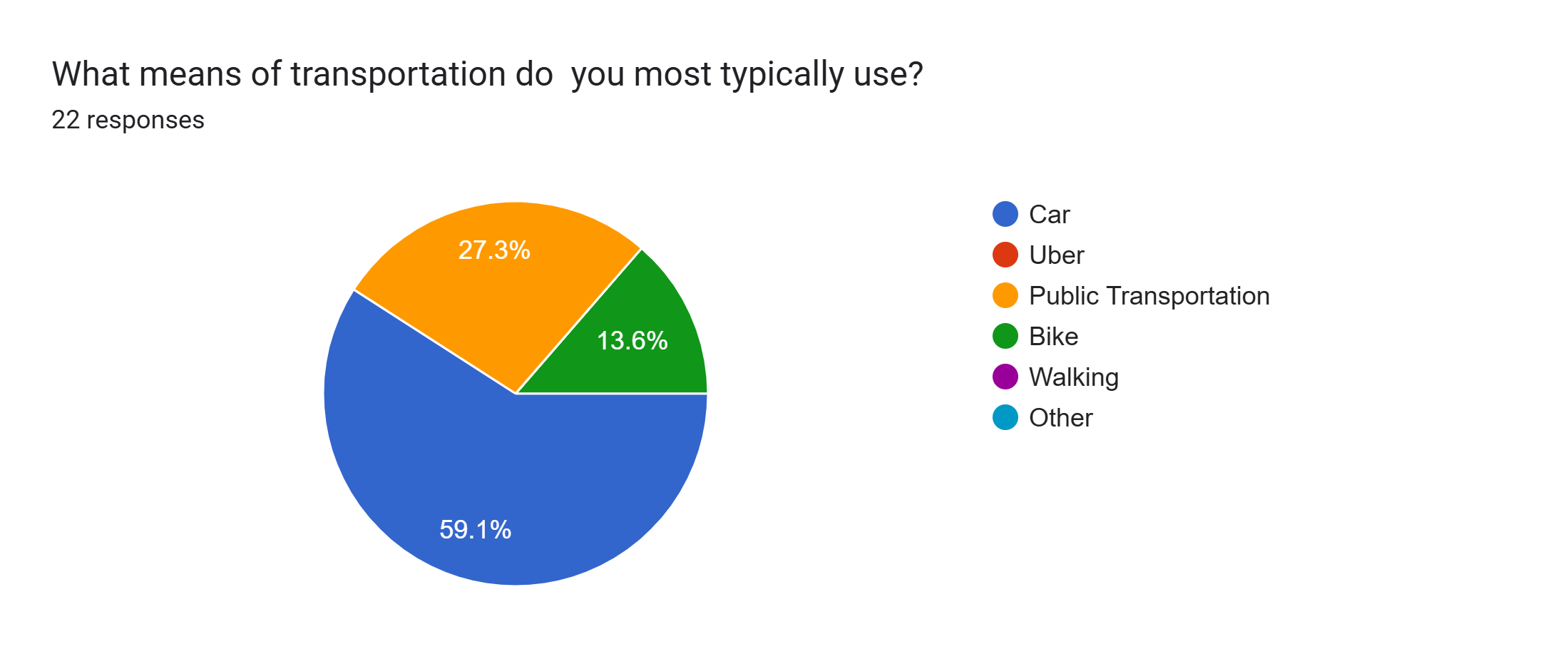
Data Points:
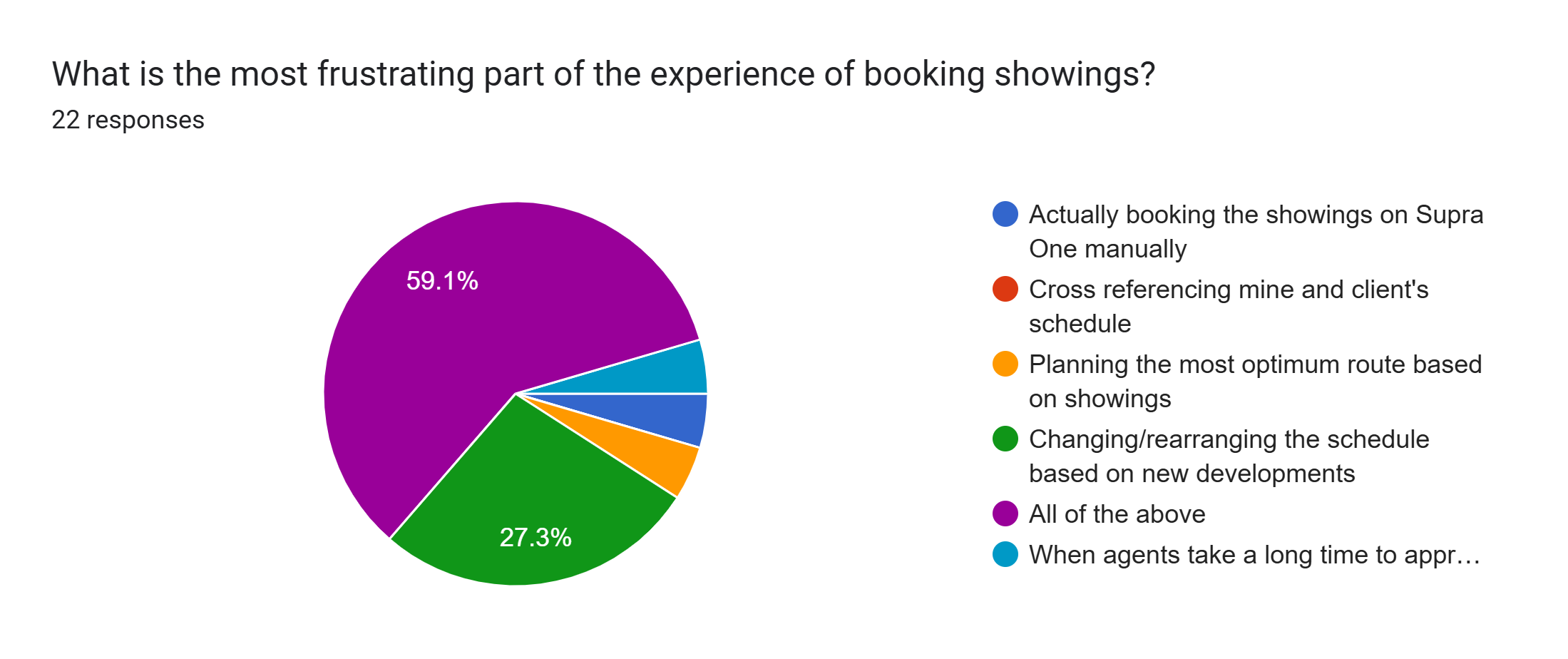
59% of respondents clicked "All of the above" confirming that planning the route, cross referencing different platforms / schedules and changing the schedule based on new developments, are points of frustration.
27% of respondents chose changing / rearranging the schedule based on new developments as a main point of frustration.
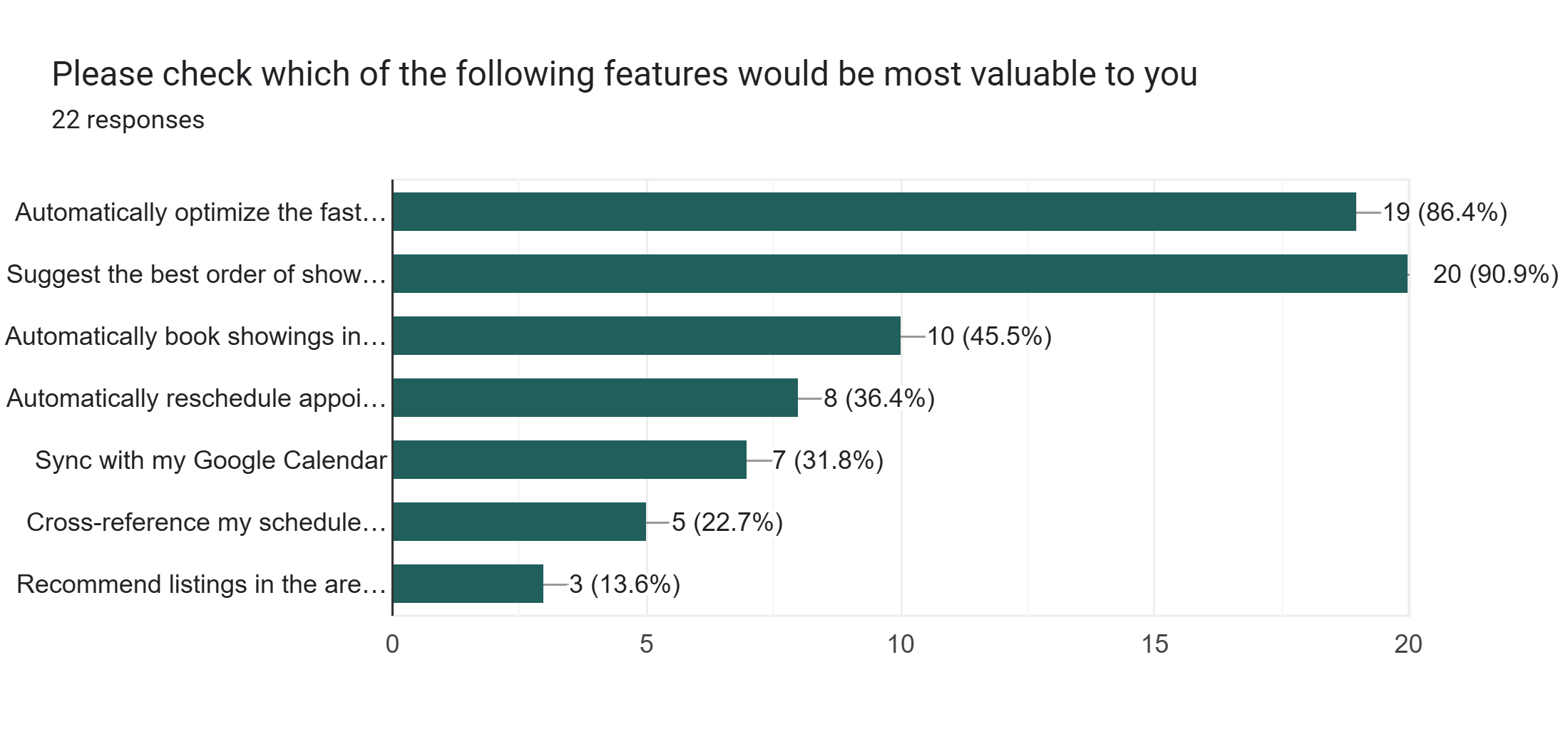
90% of respondents checked off "Suggest the best order of showings based on travel time and availability (collects data from Supra One so that you don't have to check)" as a feature they would like to see.
86% of respondents clicked "Automatically optimize the fastest route (driving, biking, or transit)" as a feature they would like to see.
Interpreting the Data
The survey validated that the scheduling challenges I experienced are shared by other realtors. The results also provided clear direction for product prioritization. The most requested features focused on automating scheduling decisions rather than simply creating another calendar. As a result, the MVP centers on reducing manual planning by optimizing routes, recommending the best sequence of showings, and adapting schedules when appointments change.
3. Defining the MVP
Personas / User Stories
In a real production environment, the next phase of discovery would consist of one-on-one interviews with realtors across different experience levels and demographics to better understand their workflows, motivations, and behaviors before creating validated personas.
In this exercise I worked with my own data from the survey I conducted to create a general persona and define user stories that inform the MVP.
Persona
Sarah
Busy Residential Realtor
Profile
A licensed residential realtor who manages multiple showings throughout the week and wants to spend less time coordinating appointments and more time serving clients.
Goals
Spend less time on administrative tasks
Fit more showings into each day
Avoid scheduling conflicts
Reduce driving time
Pain Points
Constantly switching between Supra One, Google Maps, and his calendar
Manually checking listing availability
Manually booking showings
Rearranging appointments when one changes
User Story 1
As a busy realtor, when I am planning my day
I want this app to automatically scan all showing availabilities and scheduling constraints
So that I don’t have to cross reference Supra One availability with mine and my clients scheduling constraints
Feature: App has access to Supra One showings availability data, client's google calendar and able to take AI prompts about additional constraints ("I don't want to work past 5 today, I need a lunch break from 1-2PM, I don't want to take any highways" etc.)
User Story 2
As a busy realtor, when I am planning my showings route
I want this app to optimize the best driving or public transit route
So that I spend less time traveling and less gas
Feature: App is connected to Google Maps and possibly Public Transit alerts to be able to suggest most optimized route.
User Story 3
As a busy realtor, when I have my schedule ready
I want my showings automatically booked into Supra One without me manually requesting each booking
So that I save time and energy when scheduling my day
Feature: App is able to automatically book showings in Supra One after the schedule is created without realtor manually logging in and booking each showing.
User Story 4
As a busy realtor, when I am booking showings
I want this app to automatically rearrange the schedule based on new developments and constraints
So that I don't have to
Feature: App able to take prompt "My client Ali is now busy from 4-5PM tomorrow, can you reschedule the showings to accommodate?"
Product Goal
Create an AI assistant that reduces the amount of manual scheduling required for realtors.
MVP Objective
Allow a realtor to generate an optimized showing schedule using listing availability, calendar availability, and travel time and then auto-book those showings in the Supra One App.
Based on user research, I prioritized the smallest feature set capable of solving the biggest pain point. Rather than attempting to build a full real estate platform, I focused exclusively on reducing manual scheduling effort.
How did I prioritize the features for the MVP and decide what is out of scope?
The MVP feature set was prioritized based on both my survey results and market research. Survey responses confirmed that the biggest pain points for realtors are determining the best showing order, creating the most efficient route, and adjusting schedules when changes arise. As a result, these features became the primary focus of the MVP.
Market research also showed that listing details are already available through MLS and other existing platforms, so including them would not provide significant additional value. Similarly, CRM integration and communication features were excluded because they are not essential to solving the core scheduling problem. Finally, I chose not to build a dedicated calendar interface since the app is designed to automatically sync appointments with the user's Google Calendar instead. This avoids adding unnecessary complexity to the user experience, allowing realtors to continue using a calendar they're already familiar with.
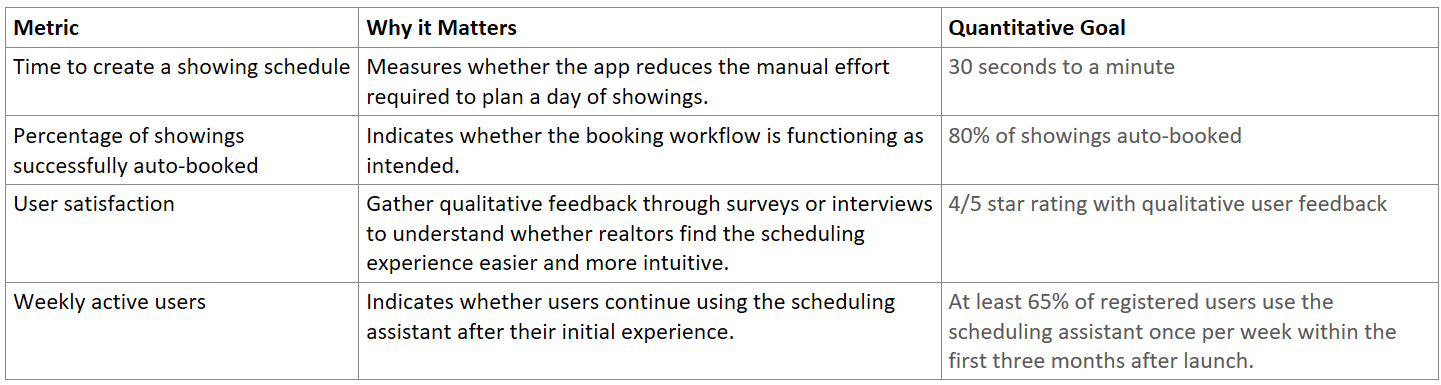
Success Metrics

4 . Wireframes and Prototyping
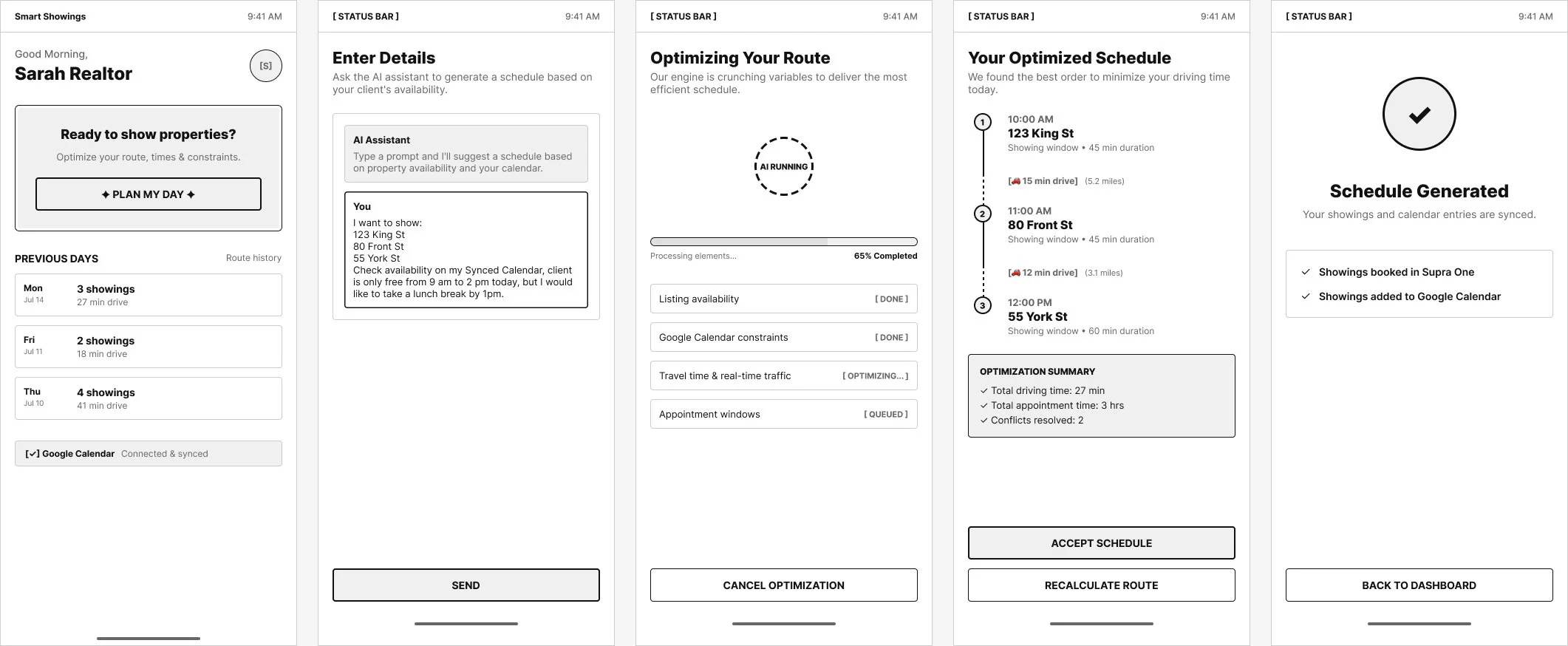
I began by creating low-fidelity wireframes to map out the core user journey for the minimum viable product (MVP). I first identified the essential screens required to support the experience, then sketched the layout of each one.
The flow begins with the dashboard, where users can access the AI scheduling assistant through clicking the “Plan My Day” button. From there, users enter a prompt describing their scheduling needs, after which a loading screen communicates that the AI is generating an optimized route. Once complete, the user is presented with their recommended schedule and travel route, which can then be automatically synced to their Google Calendar for seamless integration into their daily workflow.
Wireframes below:
For the high-fidelity prototype, I refined the wireframes by applying a cohesive visual design, including typography, color, and spacing, to better reflect the intended user experience. I also added interactive prototype connections, allowing users to navigate through the core MVP workflow.
To experience the prototype, click "Access High-Fidelity Prototype" button below and follow the user journey by selecting "Plan My Day" → "Generate Optimized Route" → "Accept Schedule" → "Back to Dashboard."
5 . Retrospective
Assumptions from Research Phase
During this phase, I made several assumptions:
Respondents in the WhatsApp group chats were licensed real estate professionals.
Survey responses accurately reflected their daily workflows.
Pain points reported by respondents were representative enough to guide an MVP.
Respondents interpreted survey questions accurately.
Lessons Learned From Research phase
Lesson 1: Capture User Demographics
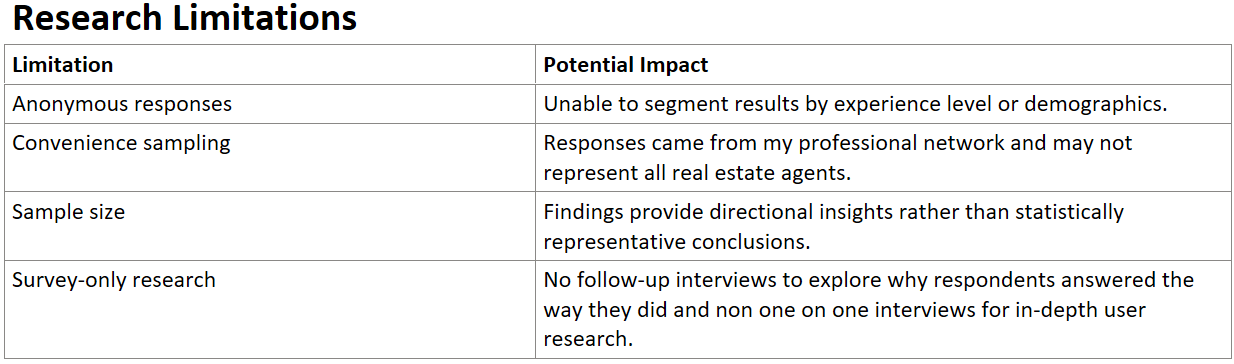
While anonymity encouraged participation, I missed the opportunity to collect demographic information such as years of experience, market specialization, or transaction volume. This would have enabled more meaningful user stories and personas.
Lesson 2: Improve Survey Design
One survey question asked respondents to identify which software they used, but it only allowed a single selection. In hindsight, many agents rely on multiple platforms throughout their workflow. A multi-select question, or asking which tool they use most frequently, would have produced more accurate data.
Lesson 3: Iterate Research
In a real-life product environment, I would revise the survey based on the above learnings and conduct a second research round before finalizing requirements. Since this was a portfolio project distributed within my personal professional network, I decided not to resend an updated survey to avoid survey fatigue among participants.
If you made it this far, thank you for taking the time to explore my work.
I'd love to hear your thoughts on this case study. Whether you have feedback, questions, or just want to chat about product, AI, or design, I'd be happy to connect.
→ Get in touch through either the Email button or LinkedIn button below